Capture the thought before it escapes.
Spatial Markdown for AI-native brains
Your brain isn't a list.Stop flattening it into one.
Think in color, shape, space, and connection—then hand the whole picture to AI. Nodetaker turns your visual thought process into readable Markdown context.
Founding beta · One payment. No subscription.
macOS 13+ · Local-first · No account
BIG IDEAwhat if?CONNECT ITSHIP THIS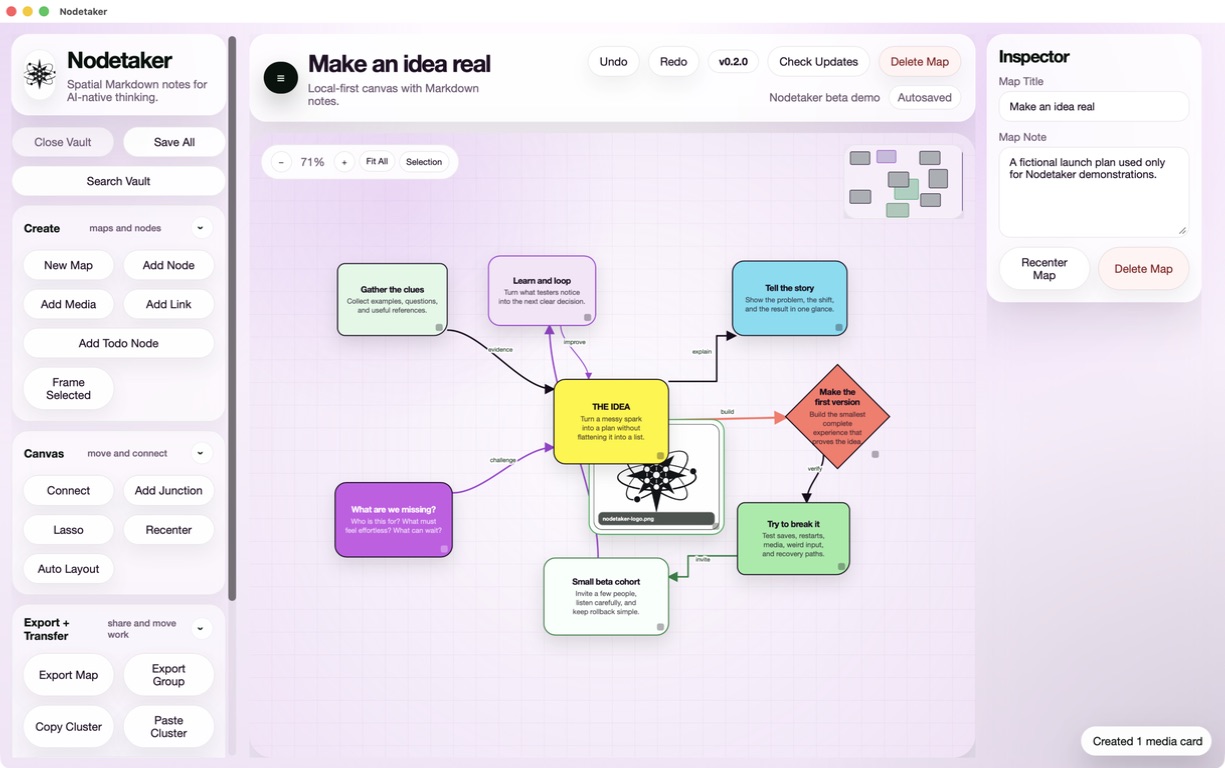
THINK VISUALLY✦STORE LOCALLY✦EXPORT TO AI✦KEEP THE CONTEXT✦THINK VISUALLY✦STORE LOCALLY✦EXPORT TO AI✦KEEP THE CONTEXT✦
01 Why spatial?
Lists show the items. A map shows the idea.
Scale, proximity, color, and connection are information. Nodetaker lets you use all of them—without making “building a system” your new full-time hobby.
The Crayola version of a second brain.
Let position say what paragraphs can’t.
Draw the line. Spot the loop. See the system.
No database ceremony. No setup spiral.
02 The actual magic
The map becomes context.
Nodetaker compiles the map—notes, relationships, positions, and structure—into one Markdown file an AI model can read.
9nodes8edges
One export keeps the notes and the relationships together, so you can choose what context to share with an AI.
THE IDEA
frontend
backend
questions
ship it
human-shaped contextyou think→AI gets it
03 Under the pretty pixels
Every node is just a file.
Plain, portable, human-readable Markdown. Your vault lives in a folder you choose.
release-flow.md
---
type: node
title: Release flow
x: 820
y: 410
shape: rounded
fill: "#fff500"
links:
  - ship-checklist
  - launch-page
---
The map is the context.
#launchRelease flow
The map is the context.
NO ACCOUNT Open a folder and go.NO CLOUD LANDLORD Your files stay yours.NO LOCK-IN Read them without Nodetaker.
04 More than text
Drop your whole project onto the canvas.
Ideas rarely arrive as tidy notes. Bring the evidence with them.
BETA APP PREVIEWLOCAL MEDIA
IMGImages+
PDFDocuments+
XLSSpreadsheets+
WAVAudio+
MOVVideo+
URLLinks+
05 Built in the real world
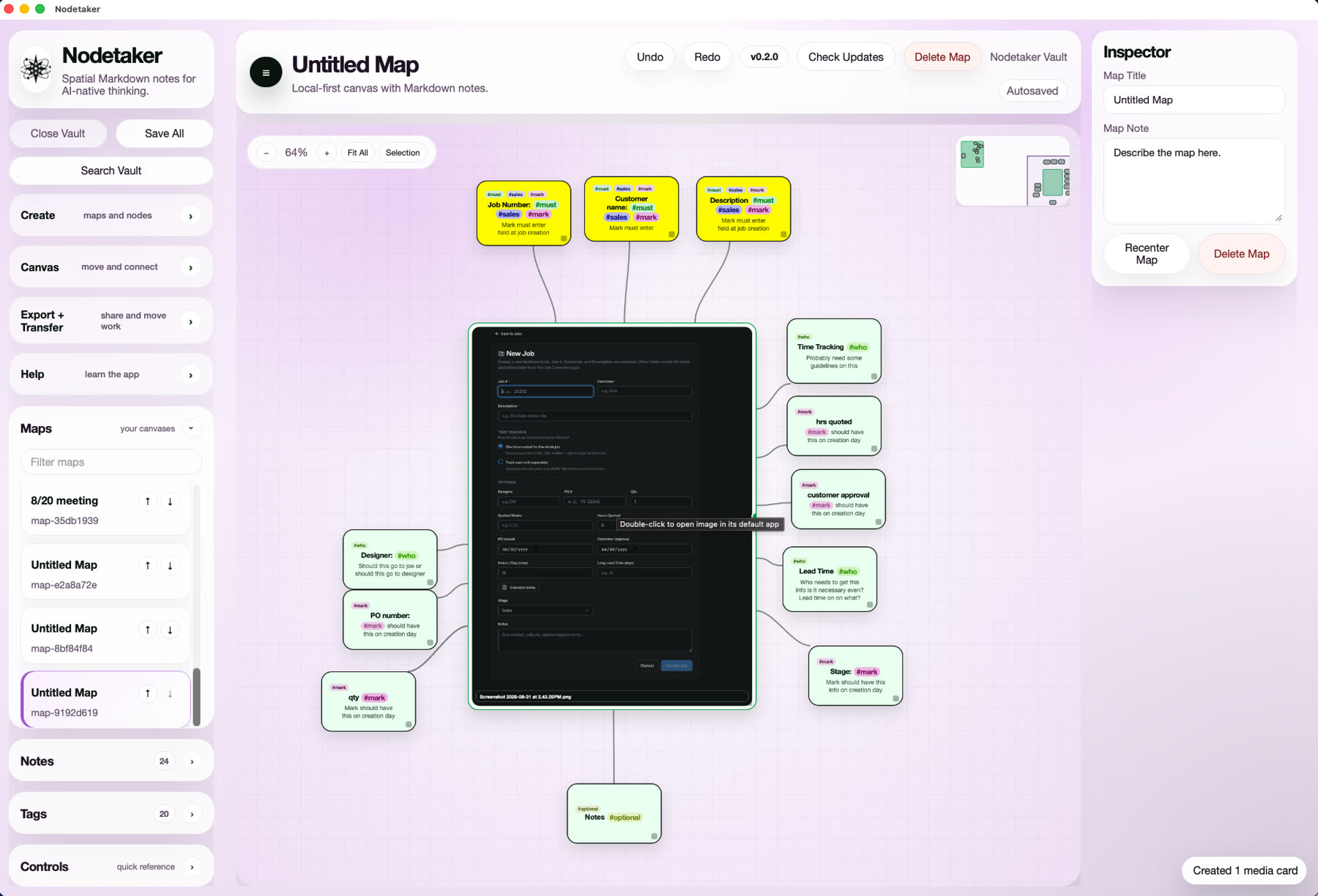
Not a concept. A canvas already doing the work.
Start empty, build something useful, zoom out, and carry the structure forward.
01 · START EMPTY
Begin with nothing in the way
Open a fresh canvas, add the first thought, and let the structure emerge as you work.
02 · FULL SYSTEM
See the entire workflow
Zoom out from one note to a complete process without flattening it into rows and columns.
03 · REAL WORK
Shape information your way
Turn the same canvas into roles, stages, priorities, or any structure the project needs.
04 · MAP TO AI
Hand the structure to AI
Export the map as readable context, then let an AI work from the relationships—not just a pile of notes.
Made for
BUILDERS · STUDENTS · ENGINEERS · RESEARCHERS · DESIGNERS · CREATIVE PEOPLE ·
and anyone connecting a ridiculous number of threads.
FOUNDING BETA
NO SUBSCRIPTIONYOUR FILESBIG CANVAS ENERGYGet the beta.
Make room for your ideas.
$7.77
ONE-TIME BETA PURCHASE · NO SUBSCRIPTIONBuy the beta ↗- ✓ Local-first desktop app
- ✓ Spatial Markdown vaults
- ✓ Universal Mac download
- ✓ Notes, media, and connections
You're purchasing early-access software. Expect bugs and changes as the beta develops.
Mac only · 14-day full refunds · Founding-beta updates included.
06 Fine print, but friendly
Questions, connected.
Does Nodetaker upload my notes?
No. The desktop app is local-first. Your vault lives in the folder you choose, and you decide what to export or share with an AI.
Is this another complicated “second brain” system?
No taxonomy degree required. Drop in an idea, move it, color it, connect it, and keep thinking.
Is it just a mind map?
Use it as one—or use it for software architecture, meeting plans, QA, research, process engineering, and the occasional vacation.
Which systems does the beta support?
macOS 13 or newer on Apple Silicon or Intel. Windows is not included in this release yet.
Do I need the internet?
Your core canvas and vault work locally. Internet is only needed for things like downloading the app, checking for updates, or opening a web link you choose.
What am I buying?
The Nodetaker founding beta for Mac, for one payment of $7.77 USD. It's early-access software, so expect bugs and changes as development continues. There is no subscription.
How do I get the app after paying?
Use “Download Nodetaker” in your Lemon Squeezy confirmation or receipt to open your personal download page. Keep that receipt for future installs. You don't need a Nodetaker account or license key. For a missing receipt or download, email us for help.
What if the beta isn’t for me?
Request a full refund within 14 calendar days of purchase, even after downloading or trying the app. Read the refund policy and request a refund.